Does your financial picture feel like a blurry collage of receipts, app notifications, and forgotten cash withdrawals? You’re not alone. The modern reality of spending across cash, cards, and digital wallets creates a unique kind of financial fog. The core challenge isn’t just tracking your expenses—it’s getting a single, accurate view of them when your money leaves your hand in three different ways. This guide cuts through that confusion. We’ll help you choose the right system to track spending by payment method, one that actually fits your habits, so you can replace guesswork with clarity.
The best way to track expenses across cash, cards, and apps is to choose a single, centralized system that matches your consistency level. For disciplined trackers, a manual spreadsheet offers total control. For most, a dedicated expense app provides automation for digital payments and reminders for cash. For a hands-off approach, linked-account aggregators offer near-full automation, though cash requires a separate step.
Why Tracking by Payment Type Is a Unique Challenge
If you only used cash, you could just count what’s left in your wallet. If you only used a single card, your monthly statement would tell the whole story. The real headache begins when your spending is split across physical bills, multiple debit/credit cards, and apps like Venmo or Apple Pay. This mix creates a perfect financial fog.
The core issue is that each payment method operates on a different timeline and leaves a different trace. Card and app transactions have a delay—they might be “pending” for days before they clear, making your real-time balance unreliable. Cash, on the other hand, vanishes instantly with no digital record at all. Trying to track spending by payment method by mentally juggling these disparate sources is exhausting and error-prone. You’re not just tracking expenses; you’re conducting a daily reconciliation across multiple ledgers that don’t talk to each other.
Your Tracking Personality: Finding Your Fit
Before comparing tools, the most critical step is self-assessment. The best system for you isn’t the one with the most features; it’s the one you’ll actually use consistently. Ask yourself these key questions to identify your tracking style:
- How consistent are you? Are you the type to log a coffee purchase immediately, or do you tend to forget until the end of the week?
- What’s your cash-to-card ratio? Do you use cash for most daily small purchases, or is it just for the occasional farmer’s market or tip jar?
- What’s your goal? Do you need real-time alerts to avoid overspending, or is a clear monthly summary for budgeting enough?
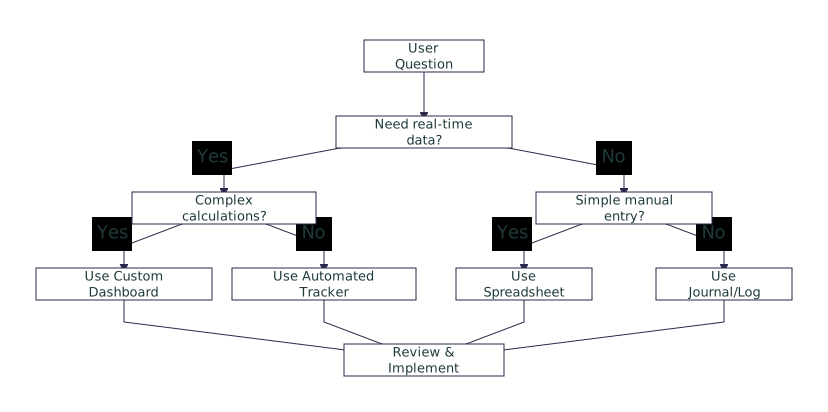
Your answers point toward one of three core expense tracking methods. If you’re highly disciplined and detail-oriented, a manual system might work. If you want a balance of automation and control, an app-assisted approach is likely your sweet spot. If you want the least daily effort and spend mostly digitally, full automation could be the answer.
Method Showdown: Manual, App-Assisted, and Automated

Photo by Jakub Zerdzicki on Pexels
Let’s break down the three primary methodological approaches for managing cash vs card expenses. Each has a distinct workflow, ideal user, and trade-off.
| Method | How it Handles Cash | How it Handles Cards/Apps | Best For / Biggest Drawback |
|---|---|---|---|
| Manual (Spreadsheet/Notebook) | You must record every single cash transaction yourself, immediately. | You manually enter or import statement data, categorizing each transaction. | Best for: Detail-oriented people who want total control and love data. Drawback: High maintenance; easy to fall behind. |
| App-Assisted (Dedicated Budgeting App) | You log cash spends in the app, often with a quick photo or note. | App connects to accounts, auto-imports & categorizes most transactions. | Best for: Most people. Balances automation with manual cash tracking. Drawback: Requires linking financial accounts. |
| Automated (Account Aggregator) | Cash is the weak spot. You must use a separate “cash withdrawal” category or a companion app. | Fully automated. Aggregates all digital transactions into one dashboard. | Best for: Digital-heavy spenders who want a hands-off overview. Drawback: Cash spending becomes an invisible “leak” unless manually noted. |
For a manual approach, using a template like Google Sheets or a physical expense notebook provides structure. For app-assisted tracking, platforms like YNAB (You Need A Budget) or Monarch Money are popular for their robust categorization and linking features. The automated method is exemplified by services like Mint (now discontinued) or personal finance dashboards offered by some banks, which focus on aggregation over daily logging.
Scenario: Choosing Your System in Practice
Let’s see how this decision framework works in real life. Here are two common scenarios and the system that likely fits best.
The Frequent Cash User (e.g., a tradesperson or market shopper): You get paid in cash for side jobs and use it for lunches, supplies, and fuel. An app-assisted method is your winner. Set up a budgeting app and connect your bank account for bills and card purchases. For cash, get in the habit of opening the app right after a transaction. Use its “quick add” feature—snap a photo of the receipt or just type “£12, fuel, cash.” This keeps your cash visible alongside your digital spending, giving you that unified view.
The Digital-Only Spender: You pay for everything with a credit card for points and use apps for subscriptions and peer-to-peer payments. You just want to see where your money went each month. An automated aggregator is ideal. Link all your accounts (checking, credit cards, PayPal) to a single dashboard. Your only manual task? When you take out cash from an ATM (rarely), immediately categorize that withdrawal as “Cash – Entertainment” or similar in the system. This way, that lump sum is accounted for, even if the individual cash spends aren’t tracked.
For a small business owner mixing payment types, the principles are similar but scale with volume. An app-assisted method using dedicated business software (like QuickBooks) that allows for payment method categorization in reports is often the most sustainable way to organize expenses by payment type for tax and deduction purposes.
Commit to Clarity, One Month at a Time
The search for the perfect system can become its own form of procrastination. Here’s the decisive truth: consistency with a “good enough” method will always beat a “perfect” system you abandon after a week. Your next step isn’t more research—it’s action.
Review the three methods above. Pick the one that most closely matches your answers to the key questions. Then, commit to using it exclusively for the next 30 days. Download that app tonight and link one account, or open that spreadsheet and log today’s spending. The goal for this month isn’t a flawless audit; it’s building the habit and finally seeing where your money actually goes, across every payment type. Start there, and the clarity will follow.