
It’s a scene you know all too well: a utility bill propped against the toaster, a credit card statement buried in the week’s mail, and a calendar notification for a car payment you swear was due next week. This scattered, reactive approach to your monthly expenses isn’t just messy—it’s a direct pipeline to financial stress, late fees, and that nagging feeling that your money is managing you, not the other way around. The good news is that it doesn’t have to be this way. Transforming this chaos into calm control isn’t about finding more willpower; it’s about implementing a simple, reliable bill organization system. This guide is your practical blueprint for moving from overwhelm to automation, helping you design a bill tracking setup that works quietly in the background, so you can stop worrying about due dates and start trusting your process.
A bill organization system is a consistent method for tracking, scheduling, and paying your household expenses. The best system is the one you’ll actually use, whether it’s a simple binder, a digital spreadsheet, or an automated app. Start by gathering all your bills in one place to assess what you’re dealing with. The right one for you balances simplicity with reliability, fitting seamlessly into your existing routines to reduce mental load.
Your 7-Step Bill Organization Checklist (Start Here)
Feeling overwhelmed? Don’t overthink it. Start with this immediate, actionable checklist. You can refine your system later, but these seven steps will move you from chaos to control in one sitting.
- The Great Bill Gather. Collect every single bill, statement, and financial notice from the last month. Check the kitchen counter, your desk, your email inbox, and that mysterious pile of mail. The goal is to see the full picture of what you’re managing.
- Create Your Master Bill List. Using a simple notebook or a new digital document, list every bill. Include the creditor (e.g., “Electric Co.”), the typical amount (or a range), and the due date. This list is the foundation of your bill tracking setup.
- Designate a Physical ‘Bill Home’. Choose one specific, accessible spot for all incoming paper bills. A tray, a folder, or a dedicated section of a wall organizer. Every piece of paper goes here immediately—no exceptions.
- Choose Your Tracking Tool. Decide on your core tool right now. Will it be a spreadsheet, a calendar, a notebook, or an app? For now, pick the simplest option you have (even the notes app on your phone works). You’ll explore better long-term tools in the next section.
- Set Payment Dates & Reminders. Based on your pay schedule, assign a specific day or two each month for bill payment (e.g., the 1st and 15th). Immediately set reminders in your phone or calendar for these dates.
- Execute Payment & Record. On your scheduled day, pay your bills from your “Bill Home.” Then, immediately record the payment in your chosen tracking tool. Mark the bill as “Paid” on the paper copy or in your digital list.
- File or Shred. Once paid and recorded, decide: file the statement for tax/record-keeping (in a simple filing box) or securely shred it. The goal is to empty your “Bill Home,” leaving it ready for next month.
Choosing Your System’s Core: Digital, Paper, or Hybrid
The best bill organization system is the one you’ll use consistently. Your personality and habits matter more than fancy features. Let’s break down the three main archetypes to help you choose your fit.

Photo by www.kaboompics.com on Pexels
The Paper-Based System (The Tactile Organizer)
This system uses physical tools: a dedicated binder with tabbed sections, an accordion file, or a bill-paying station with trays. You write due dates in a planner and keep paper statements.
Pros: Tangible, no tech required, can be very satisfying. Great for visual learners who need to see everything laid out. Cons: Can be bulky, not easily searchable, requires manual updates, and is vulnerable to physical loss.
Ideal for: If you love writing lists, distrust digital security for finances, or simply prefer the act of physically handling and filing paperwork.
The Digital Spreadsheet System (The Customizer)
The heart of this system is a spreadsheet (Google Sheets or Excel). You create a master bill list with columns for due date, amount, payment status, and maybe even a link to the website.
Pros: Highly customizable, accessible from anywhere, easy to sort/filter, and allows for calculations (like monthly totals). It’s a powerful bill management system at zero cost. Cons: Requires manual data entry and self-discipline to update. You still need to manage the actual payment process separately.
Ideal for: If you’re comfortable with basic tech, love data and customization, and want a free, flexible solution that you can tweak endlessly.
The App & Automation System (The Set-and-Forget)
This approach uses dedicated budgeting apps (like YNAB or Mint), your bank’s bill pay features, or even simple calendar automation to handle reminders and sometimes payments.
Pros: Maximum automation, real-time tracking, syncing across devices, and often connects directly to accounts for automated bill tracking. Cons: Can have subscription fees, requires trusting a third party with financial data, and may feel less “hands-on.”
Ideal for: If you’re tech-savvy, extremely busy, and want to minimize manual steps. Perfect for those who want their system to run mostly in the background.
Essential Components Every System Needs
No matter which core you choose, a successful system is built on five non-negotiable components. Miss one, and your household bill tracker will develop leaks.
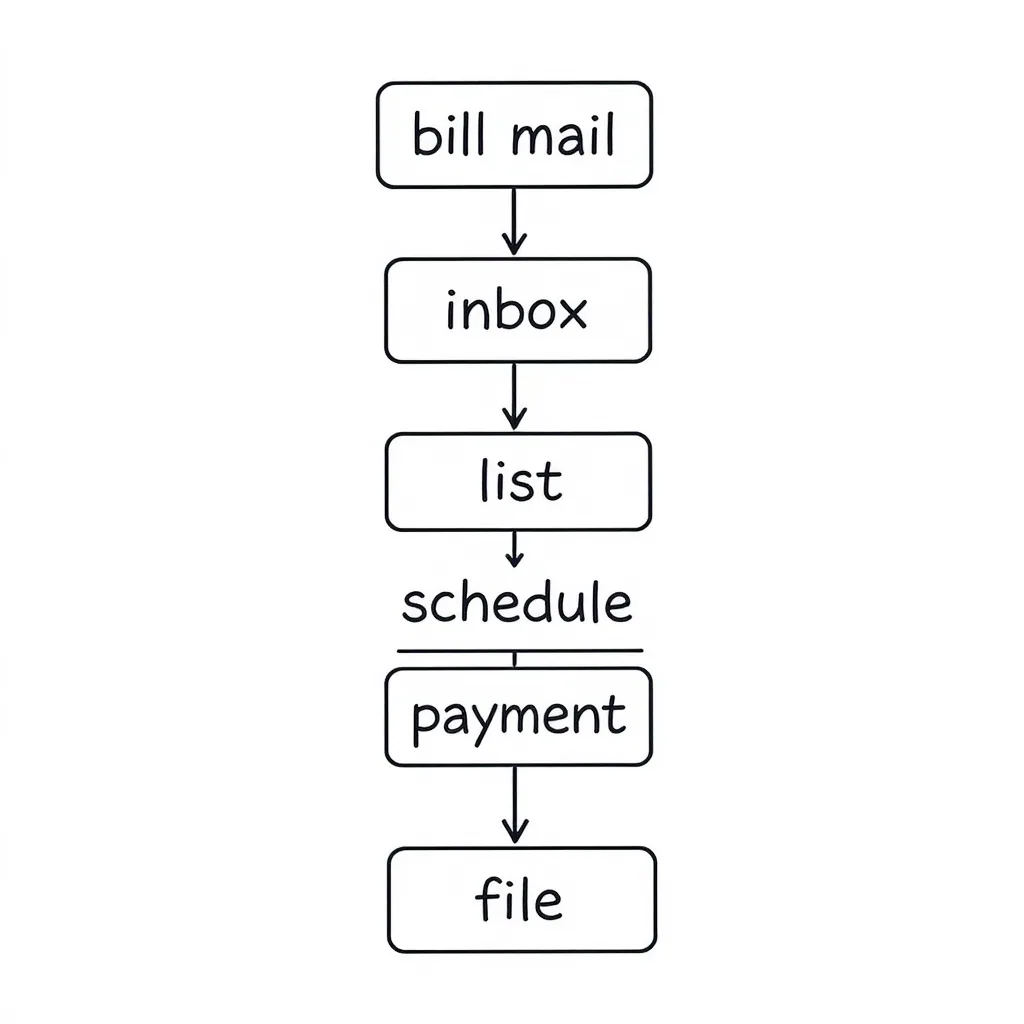
1. A Single Inbox/Collection Point
Do: Have one physical tray for all paper mail and one digital folder (e.g., a “Bills” label in your email) for electronic statements. Train everyone in the household to use it.
Don’t: Let bills land on the kitchen counter, your desk, the passenger seat of your car, and your email inbox indiscriminately. Scatter is the enemy of control.
2. A Master Bill List (Your Command Center)
This is your source of truth. It should list every recurring expense, its due date, average amount, and payment method. Do: Update it immediately when you add or cancel a service.
Don’t: Try to keep this list in your head. A written or digital master bill list offloads mental clutter and prevents forgotten bills.
3. A Consistent Scheduling Method
Your system must answer “When do I pay these?” Do: Link bill payments to specific events, like your paydays. For example, “All bills due before the 15th get paid on the 1st.”
Don’t: Pay bills randomly as they come in or when you “get around to it.” This is how late fees happen.
4. A Reliable Reminder System
Your schedule is useless if you forget it. Do: Use technology you already check—phone calendar alerts, app notifications, or even a recurring sticky note on your mirror.
Don’t: Rely on memory alone. Assume you will forget, and build a reminder that interrupts your day.
5. A Simple Filing/Record-Keeping Method
Decide what happens to a bill after it’s paid. Do: Have a simple system—a single filing box with folders for “Paid Bills [Current Year]” and “Tax Documents.” Shred anything you don’t need to keep.
Don’t: Let paid bills pile up in your “inbox” or get mixed with other mail. The act of filing (or shredding) provides closure and keeps your system clean.
Common Bill Organization Pitfalls (And How to Avoid Them)
Even with the best intentions, systems fail. Here are the most common tripwires and how to sidestep them from the start.
Overcomplicating The System At The Start
The Pitfall: You spend hours designing a color-coded, multi-tab spreadsheet with complex formulas before you’ve even gathered your bills. It feels productive, but it’s just procrastination in disguise.
The Fix: Start brutally simple. Use the 7-step checklist with a notebook and a calendar. You can always migrate to a more sophisticated tool after the habit is established.
Not Aligning The System With Your Actual Habits
The Pitfall: You set up a beautiful paper filing system, but you live on your phone and never look at your desk. The system feels like a chore and gets abandoned.
The Fix: Be honest with yourself. If you’re digital, go digital. Your bill payment workflow must fit into the life you already have, not the one you think you should have.
Forgetting Annual or Semi-Annual Bills
The Pitfall: Your monthly monthly expense organization is flawless, but you’re blindsided by your car registration, Amazon Prime renewal, or quarterly water bill.
The Fix: Add a “Non-Monthly” section to your Master Bill List. Note the bill, approximate amount, and month it’s due. Set an annual reminder in your calendar a month in advance.
Relying On Memory Alone
The Pitfall: “I’ll remember to pay the electric bill on the 3rd.” Spoiler: You won’t. Memory is for birthdays, not due dates.
The Fix: Externalize everything. If it’s not written down or in a digital reminder, it doesn’t exist. This is the single most important rule for stress-free bill management.
Mixing Bills With Other Mail
The Pitfall: Junk mail, magazines, and personal letters bury your important statements. You miss a bill because it looked like another credit card offer.
The Fix: Process your mail over a recycling bin. Immediately shred junk, and place only bills and important financial documents into your designated “Bill Home.” Keep the signal clear from the noise.
Tailoring Your System: Scenarios for Different Lifestyles
Your life stage and income style demand slight tweaks to the core system. Here’s how to adapt.
For Couples & Families: Shared Responsibility
The key is clear communication and defined roles. Designate a “Bill Manager” or rotate the task monthly. Use a shared digital spreadsheet (like Google Sheets) or a joint email inbox for bills so both parties have visibility. Schedule a monthly 15-minute “money date” to review the Master Bill List and upcoming expenses together, ensuring no surprises.
For Freelancers & Variable Income: Prioritization & Sinking Funds
Your home budget bill system must be flexible. During your Master Bill List step, categorize bills as “Critical” (rent, utilities, insurance) and “Non-Critical” (subscriptions, memberships). Pay Critical bills first from any income. For annual or large quarterly bills, create “sinking funds”—separate savings pots you contribute to each month, so the money is ready when the bill arrives.
For the Super Busy or Frequent Traveler: Maximize Automation
Your goal is a near-total hands-off system. Opt for the App & Automation core. Set up autopay for every fixed-amount bill (like streaming services, loans). For variable bills (like utilities), use your bank’s online bill pay to schedule the payment for the due date, even if you manually enter the amount each month. Rely heavily on digital statements and reminders synced to your phone.
For Those Digging Out of Debt: Visual Tracking & Integration
Your bill system should integrate with your debt payoff method (e.g., debt snowball or avalanche). Add a column to your Master Bill List for “Minimum Payment” and “Extra Payment.” Use a simple paper chart on the wall or a dedicated spreadsheet tab to track decreasing balances. The act of recording each payment becomes a motivational tool, turning a chore into a visible step toward your goal.
From Overwhelmed to Organized
The goal of implementing a bill organization system isn’t perfection—it’s consistency and peace of mind. You don’t need the most elaborate setup; you need one that works reliably enough that you stop worrying about missing payments. The relief that comes from knowing exactly what’s due, when, and how it will be paid is the real win.
Start small. Use the checklist to build your basic framework this week. In a month, you can evaluate what’s working and what’s not, then tweak it. Your system is a tool for your life, not a test you can fail. The simple act of taking control, however you define it, reduces financial stress and creates mental space for the things that truly matter to you.
Taking control of your monthly bills boils down to a few core principles. First, choose a system core—paper, digital, or automated—that aligns with your natural habits, not against them. Second, ensure your system has the five essential components: a single inbox, a master list, a schedule, reminders, and a filing method. Finally, avoid common pitfalls like overcomplication and relying on memory by starting simple and externalizing everything.
The most effective system is the one you use consistently. Don’t let the search for a perfect solution stop you from implementing a good one today. Gather those bills, make your list, and take that first step toward calm and control.