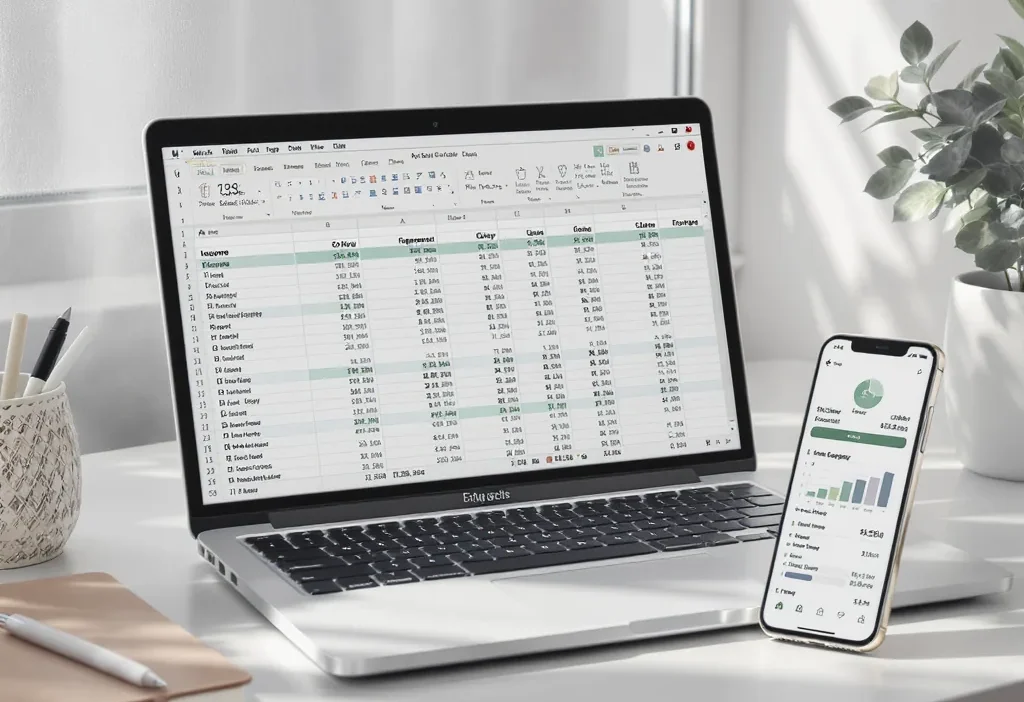
Do you crave a system that automates the tedious parts of money management, or do you need total control to customize every single line item? The choice between budget apps and spreadsheet systems is more than a simple tool selection—it’s a fundamental decision about how you prefer to interact with your finances. One path offers the convenience of hands-off tracking, while the other provides the deep insight of manual, customizable planning. Getting this match right is often the difference between a budget that feels like a helpful guide and one that feels like a frustrating chore. This guide cuts through the noise to help you understand the core philosophies, trade-offs, and practical realities of each approach, so you can invest your time in a system that actually fits your life and goals.
Choosing between budget apps and spreadsheet systems isn’t about which tool is objectively better, but which one fits your financial personality. Apps automate tracking and simplify the process, making them ideal for maintaining consistency with minimal effort. Spreadsheets offer complete customization and deep insight, perfect for those who want ultimate control and enjoy the planning process. Your goal should be to match the tool to your natural financial behavior and goals.
The Core Philosophy: Automation vs. Control
Before we dive into features, let’s talk about you. The choice between a budgeting app and a spreadsheet system isn’t really about software. It’s about your financial personality and how you want to interact with your money. This fundamental divide comes down to one key trade-off: automation versus control.
If you’re an Automator, you value your time and mental energy above all. You want a system that runs in the background, catching your transactions, categorizing them, and gently nudging you when you’re off track. You see budgeting as a necessary maintenance task, not a hobby. Your ideal digital budget tool acts like a helpful financial assistant, taking the tedious work off your plate so you can focus on the big picture.
If you’re a Controller, you crave insight and customization. You don’t just want to know what you spent; you want to know why, and you want to forecast next month, next quarter, and next year. You enjoy the process of building and tweaking a system that fits your unique life. For you, a manual budget spreadsheet isn’t a chore; it’s a canvas. You need the flexibility to ask your own questions of your data, and you’re willing to put in the manual effort to get answers no off-the-shelf app can provide.

Neither mindset is “right” or “wrong.” The goal is to match the tool to the person. Trying to force a Controller to use a rigid app will lead to frustration. Asking an Automator to manually log receipts in a spreadsheet is a recipe for abandonment. Recognizing where you fall on this spectrum is the first and most important step in choosing your financial tracking system.
Budget Apps: The Power of Hands-Off Tracking
For the Automator, modern budgeting apps are a revelation. They connect directly to your bank, credit card, and investment accounts, automatically importing and categorizing transactions. This seamless sync is their killer feature, turning budgeting from a weekly data-entry session into a quick daily check-in.
Key Benefits and How They Work
The primary advantage is, of course, automation. Once set up, these digital budget tools track your cash flow with minimal input from you. They use rules and machine learning to categorize spending (e.g., “Starbucks” goes to “Coffee Shops”), which you can always override. Most offer bill reminders, goal-setting features (like saving for a vacation), and visual reports that show your spending trends at a glance.
There are different philosophical approaches within the app world. Some apps, like the now-retired Mint, focused on passive tracking and net worth. Others, like You Need A Budget (YNAB), enforce a proactive, zero-based budgeting method where every dollar has a job. Some newer tools even link spending directly to your investment portfolio’s performance.
The Trade-Offs to Consider
This convenience comes with compromises. First is cost: most robust apps operate on a subscription model, typically ranging from $50 to $100 per year. Second is data privacy: you are granting a third-party service access to your financial login credentials (most use secure, read-only aggregation partners like Plaid). Finally, there’s rigidity: you are largely confined to the app’s pre-built categories, reports, and rules. If you have a unique income stream or a complex spending category, you might have to make it fit the app’s mold, not the other way around.
Scenario: Alex is a busy marketing manager with two kids. Between work, school runs, and activities, manually tracking every grocery trip and gas fill-up feels impossible. By using an automated budget app, Alex can simply open the app on Sunday evening, see that the “Dining Out” category is in the red for the week, and decide to cook at home more the following week—all without ever manually logging a single transaction.
Spreadsheet Systems: Your Budget, Your Rules
For the Controller, a spreadsheet is the ultimate personal budgeting software because you are the architect. Whether you use Google Sheets, Excel, or Numbers, you start with a blank grid and build a system that mirrors the exact complexities of your financial life.
The Ultimate in Customization and Insight
The biggest advantage is total freedom. You can create a custom budget template that tracks not just “Groceries,” but splits it into “Household Staples,” “Fresh Produce,” and “Snacks.” You can build intricate formulas to project cash flow six months out, account for variable freelance income, or calculate your exact savings rate. The analysis potential is limited only by your spreadsheet skills. Furthermore, your data stays completely private on your own device, and the cost is typically just the one-time price of the software (or free, with Google Sheets).
The Realities of the DIY Approach
This power demands more from you. The learning curve can be steep if you’re not comfortable with formulas. Every transaction requires manual entry (or a multi-step import-and-clean process), which demands consistent discipline. There are no automatic alerts if you overspend a category. You are solely responsible for maintaining, updating, and securing your financial tracking system.
Many people start with a free template downloaded online, which can be a great middle ground. These templates provide a proven structure, which you can then modify endlessly to suit your needs.
Scenario: Sam and Jordan are planning to buy their first home in two years. They have irregular side income and want to model exactly how different savings rates will affect their down payment timeline. They use a detailed spreadsheet to track every income source, forecast tax implications, and play with “what-if” scenarios by adjusting variables. For them, the granular control and forecasting ability of a spreadsheet is non-negotiable.
Side-by-Side: Choosing Your Financial Partner
Let’s make the budgeting app vs spreadsheet decision concrete. The table below breaks down the key differences across six critical dimensions. Use it not to find a “winner,” but to see which column aligns more closely with your personal priorities. As you read, ask yourself: which trade-offs am I more willing to accept?
| Factor | Budget Apps | Spreadsheet Systems | Key Takeaway |
|---|---|---|---|
| Cost | Typically a monthly or annual subscription fee. | Free (Google Sheets) or one-time cost for software (Excel). | Ongoing fee vs. free/one-time cost. |
| Setup & Learning Curve | Quick setup guided by wizards. Easy to learn but limited to the app’s framework. | Can be time-consuming to build or customize. Steeper learning curve for advanced features, but no limit on complexity. | Fast and simple vs. slow and powerful. |
| Automation & Ease of Use | High. Automatically syncs transactions and categorizes spending. Minimal daily effort required. | Low. Requires manual data entry or CSV imports. High daily/weekly effort to maintain. | Hands-off tracking vs. hands-on management. |
| Customization & Flexibility | Low to Moderate. Confined to the app’s pre-set categories, reports, and rules. | Extremely High. You design every aspect—categories, formulas, reports, and dashboards. | Convenient structure vs. limitless customization. |
| Data Control & Privacy | You grant access to a third-party service. Data is stored on the company’s servers. | You retain full control. Data lives on your device or private cloud drive. | Convenience with access vs. complete privacy. |
| Best For | Those who value time over control, need guardrails, or tend to forget manual tracking. | Detail-oriented planners, tinkerers, those with complex finances, or privacy-focused individuals. | The Automator vs. The Controller. |
Your perfect fit lies where your priorities score highest. If “Automation & Ease of Use” and “Setup Time” are your top scores, lean toward an app. If “Customization” and “Data Control” are non-negotiable, a spreadsheet system is calling your name.
Your Decision Checklist: Find Your Perfect Fit
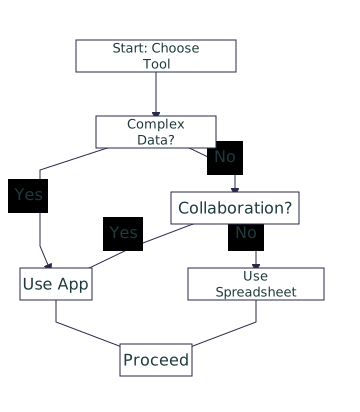
Still on the fence? This quick checklist turns the comparison into a personal diagnosis. Answer these questions honestly to see which path feels more natural.
- Do you frequently forget to log cash purchases or lose receipts? (If yes, an app’s automation is crucial.)
- Do you get a sense of satisfaction from organizing data and building systems? (If yes, you might enjoy a spreadsheet.)
- Is your financial situation relatively standard (salaried job, typical expenses), or is it complex (multiple businesses, irregular income, unique investments)?
- When you look at your spending, do you want a simple “good/bad” overview, or do you want to drill down into sub-categories and create custom reports?
- Are you willing to pay an annual fee to save 2-3 hours of manual work each month?
The Hybrid Approach: The Best of Both Worlds?
You don’t necessarily have to choose just one. A popular hybrid strategy uses both tools for different purposes:
- Use a budgeting app for daily and monthly tracking. Let it automate transaction imports and provide a quick, real-time view of your spending against simple categories.
- Use a spreadsheet system
- This approach lets the app handle the tedious data collection while giving you the spreadsheet’s power for high-level strategy. It requires a bit more management but can be the perfect compromise.
The most important step is to start. Pick the system that best matches your answers to the checklist and commit to using it for one full month. You can always switch or adapt later.
Take the Next Step Toward Financial Clarity
By now, the path should be clearer. You’ve explored the philosophical divide, weighed the trade-offs, and even run through a personal checklist. The “best” system is the one you will actually use consistently. So, don’t get paralyzed by the pursuit of perfection.
Your decisive next step is this: based on your gut reaction to the Automator vs. Controller descriptions, choose one method to trial for the next 30 days. If you leaned toward apps, sign up for a free trial of a popular option. If spreadsheets called to you, download a simple template and commit to logging your expenses manually for one month.
The goal of this first month isn’t to have a flawless budget. It’s to learn about your own habits and see if the tool’s workflow fits your life. An imperfect system you stick with is infinitely more powerful than a “perfect” system you abandon. Start where you are, use what you have, and begin building the financial awareness that will serve you for years to come.
Choosing the right budgeting method hinges on understanding your own preferences. Budget apps excel through automation, syncing with your accounts to provide a low-effort, consistent overview of your finances—ideal if you value time and simplicity. Spreadsheet systems offer complete control and deep customization, perfect for detail-oriented individuals who enjoy crafting their own financial tracking systems and don’t mind manual data entry.
The core trade-off is clear: convenience and structure versus flexibility and insight. There is no universally “best” tool. Your perfect fit is the one that aligns with your financial personality, your willingness to engage with the process, and the complexity of your money life. Whether you choose an app, a spreadsheet, or a hybrid of both, the act of choosing and starting is what truly moves you forward.