What if the most effective budget isn’t about willpower or restriction, but about designing a system you barely have to think about? The common struggle with money often stems from a reactive cycle of tracking past mistakes, which feels like a chore and is easy to abandon. The counterintuitive truth is that sustainable financial control comes from building a proactive guardrail—a kind of financial autopilot. This is the core promise of budget automation and alert setup: using digital tools to automatically track your spending against your goals and sending you smart notifications before you veer off course. It transforms budgeting from a monthly guilt-trip into a continuous, gentle guidance system, freeing up mental energy and preventing overspending before it happens. Think of it less as tracking every penny and more as setting up a reliable co-pilot for your finances.
Budget automation and alert setup involves using apps or your bank’s features to automatically categorize transactions and notify you when you’re approaching a spending limit. The goal is to create a proactive financial guardrail, not just track past mistakes. It’s about establishing a system that works for you in the background, turning intention into automatic action and giving you real-time awareness without constant manual effort.
Why Manual Budgeting Fails (And What Automation Solves)
Let’s be honest: traditional budgeting often feels like a chore you’re destined to fail at. You start the month with a detailed spreadsheet, full of good intentions. But then life happens—a quick coffee here, an unplanned dinner there—and by week two, you’ve either forgotten to log a transaction or you’re avoiding your budget out of guilt. This cycle of forgetfulness, tedious data entry, and reactive shame is why so many people give up. The problem isn’t a lack of willpower; it’s that you’re using a system designed for failure.
This is where budget monitoring automation changes the game. Instead of you tracking your money, the system does it for you, in real time. The psychological shift is profound: you move from restriction (“I can’t spend this”) to empowered awareness (“I know exactly where my money is going”). Automated expense tracking solves the core pain points by eliminating manual entry, providing instant visibility, and reducing the mental load. As research into behavioral economics and money habits shows, reducing friction and decision fatigue is key to building sustainable financial behaviors. Automation turns your budget from a nagging parent into a helpful assistant.
Your Automation Toolkit: Apps, Banks, and Spreadsheets

Photo by Julio Lopez on Pexels
You have three main paths to automation, each with a different flavor of hands-on effort. Your choice depends on how much you want to manage versus how much you want the tool to manage for you.
1. Dedicated Budgeting Apps (The Hands-Off Conductor)
Apps like Mint, YNAB (You Need A Budget), and PocketGuard are built for this exact purpose. You connect your bank and credit card accounts, and they automatically pull and categorize every transaction. They excel at giving you a unified, bird’s-eye view of your finances across all institutions. The heavy lifting of automated budget tracking is done for you. The trade-off is trusting a third-party service with your financial data (always check their security policies). This is the ideal route if you want the most seamless, “set it and mostly forget it” experience.
2. Modern Bank & Credit Card Features (The Built-In Sentinel)
Many banks and credit card issuers have significantly upgraded their apps. You can now often set spending alerts budgeting directly within your account settings—notifications for when you exceed a daily spend, approach a category limit, or have a low balance. The huge advantage is simplicity and security; everything stays within your existing banking relationship. The limitation is that these alerts are usually siloed. Your Chase card won’t know about your Amex spending, so you miss the holistic picture.
3. Advanced Spreadsheets (The Customizable Engine)
For the spreadsheet wizard, tools like Google Sheets with connected services (like Plaid) or even manual import scripts can create a powerful, fully customized automated system. This offers maximum flexibility and control, with no data sharing beyond what you authorize. It’s the most powerful but also the most technically demanding option, requiring ongoing setup and maintenance.
Quick-Start Recommendation
Not sure where to begin? Follow this simple decision path:
- For total beginners: Start with your bank’s native alert features. It’s free, secure, and immediate.
- For holistic oversight: Choose a reputable budgeting app. The automation is comprehensive and user-friendly.
- For control enthusiasts: Explore a template for an automated spreadsheet if you enjoy tinkering with systems.
- Critical step: Whichever you choose, enable two-factor authentication on that account immediately.
The Core Setup: Defining Your Categories and Alert Triggers
Now for the strategic part. Automation isn’t about tracking every penny; it’s about guarding the lines that matter most. Your goal is to identify 3-5 variable spending categories where you tend to overslip or simply want more awareness—think Dining Out, Groceries, Entertainment, or Shopping.
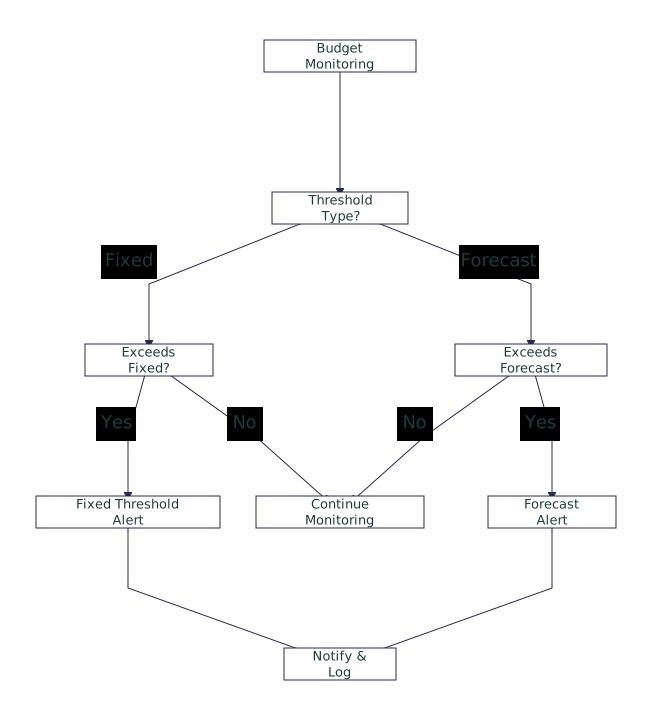
For each category, you’ll set two things: a realistic monthly limit (based on your past spending audit) and alert thresholds. This is where you move from passive tracking to proactive automatic spending notifications.
Choosing Your Alert Tiers
Not all alerts are created equal. Think of them as a two-stage warning system:
- The “Heads Up” Alert (75%): This is your early warning. When you hit 75% of your Dining Out budget, you get a polite nudge. It tells you the week is getting expensive, prompting you to cook at home a few more times.
- The “Check Yourself” Alert (90-95%): This is the critical warning. You’re about to breach your limit. This alert forces a conscious decision: Do I stop spending here, or do I consciously move money from another category (like “Entertainment”) to cover it?
For fixed, essential bills (rent, utilities, car payment), you might only set a single alert at 95% to ensure you have the cash available. For truly discretionary “fun money,” the two-tier system is perfect. The act of defining these categories and thresholds is you programming your budget guardrails setup.
Building Your Maintenance Routine
The biggest myth about automation is that it’s “set and forget.” A better phrase is “set and review.” Your automated expense tracking system and smart budget notifications provide the data, but you still need to interpret it. This is where you build a lightweight, sustainable habit.
Establish a weekly 5-minute check-in. Open your app or spreadsheet. Don’t scrutinize every transaction; just look at the alerts. Did any fire? Why? Was it a planned special occasion or mindless spending? This isn’t about guilt, it’s about pattern recognition. Then, do a monthly review ritual. When the month resets, look at your categories. Were your limits realistic? Did you consistently blow past your grocery budget? Maybe the limit needs adjusting, or maybe you need to set a stricter 80% alert. The system is a living tool that should adapt to your life, not the other way around.
Common Pitfalls to Sidestep
Even with the best tools, a few common mistakes can derail your system. Here’s how to avoid them.
1. Alert Fatigue (The Boy Who Cried Wolf)
The Pitfall: Setting alerts for every category at a very low threshold (like 50%). Your phone will buzz constantly, and you’ll quickly start ignoring all notifications, including the important ones.
The Fix: Be surgical. Only set alerts for your key 3-5 variable categories. Use the tiered system (75%/95%) so the first alert is informational and the second demands action.
2. The “Set-and-Forget” Fallacy
The Pitfall: Connecting your accounts, setting rules, and then never opening the app again for months. When you finally check, you’re faced with a confusing mess of old alerts and outdated categories.
The Fix: Commit to the 5-minute weekly check-in. The value is in the consistent, lightweight engagement, not the annual deep dive.
3. Over-Automating Too Soon
The Pitfall: Trying to create automated budget alerts for complex, irregular categories like “Home Maintenance” or “Gifts” right from the start. These fluctuate wildly and can make your system feel inaccurate and frustrating.
The Fix: Master your core variable categories first. Let irregular expenses be tracked manually or with a simple savings goal for the first few months until you understand their pattern.
4. Ignoring Alert Conflicts
The Pitfall: Setting a category limit in your budgeting app but also a similar alert in your bank app, causing duplicate or conflicting notifications.
The Fix: Decide on your single source of truth. If you’re using a budgeting app for categories, turn off category-based alerts in your bank app and only use it for critical security alerts (like low balance).
Your Financial Autopilot, Engaged
The work of setting up budget automation and alert setup is upfront. It requires an hour or two of focused attention to audit, choose, connect, and define. But the return on that investment is measured in months and years of reduced anxiety and increased confidence. You are not building a cage of restriction, but a framework of awareness. The alerts serve as your co-pilot, pointing out the terrain ahead so you can steer calmly, while the automation handles the tedious instrumentation. The result isn’t just a better budget—it’s a quieter mind when it comes to money, and the freedom to spend (yes, spend!) within your clear, self-defined boundaries without second-guessing. That’s financial peace, automated.
Shifting to an automated budget system is a two-phase process: building your toolkit, then establishing your routine.
Phase 1: The Toolkit. Choose your automation path—a dedicated app for holistic tracking, your bank’s built-in features for simplicity, or a custom spreadsheet for control. Connect your accounts and set your core guardrails: define 3-5 variable spending categories and set intelligent alert thresholds (like 75% for a warning and 95% for a critical alert).
Phase 2: The Routine. Automation informs, but you review. Commit to a weekly 5-minute check-in to assess any alerts and a monthly review to adjust categories and limits as your life changes. Avoid common pitfalls like alert fatigue and the “set-and-forget” mindset.
This system transforms budgeting from a monthly chore into a background process that empowers your everyday financial decisions.