If your financial life feels like a chaotic digital scavenger hunt—with logins scattered across a dozen apps, subscriptions you forgot you had, and that sinking feeling on the 15th of the month when you wonder where all the money went—you’re not alone. The promise of digital budgeting often crumbles under the weight of too many tools and not enough clarity. The good news is that organizing your finances doesn’t require a finance degree or military discipline; it simply requires a few smart digital budget organization hacks to corral the chaos into a single, clear view. This guide is your playbook for moving from scattered anxiety to streamlined control, using a practical, step-by-step system built on consolidation, automation, and simple habits.
The best way to organize your budget digitally is to consolidate all your accounts into one tracking platform, automate transaction imports, and establish a weekly 15-minute review ritual. This creates a simple, always-current financial picture. Effective digital budget organization starts with a single-source-of-truth system, uses automation to reduce manual entry, and focuses on consistent, simple review habits to build lasting clarity.
Phase 1: Digital Ground Zero – Your Financial Inventory
Before you touch an app or open a spreadsheet, you need a complete picture. This step is your digital budget setup foundation—it’s about gathering every financial data point into one master list. Think of it as a financial inventory, not a judgment. The goal is visibility.
Grab a notebook or a blank document and list everything: every checking and savings account (even the forgotten one from that old credit union), all credit cards, any loans (student, auto, personal), investment accounts, and every recurring bill or subscription. Don’t forget digital wallets or payment apps like PayPal or Venmo. This list is your “Digital Ground Zero.” It’s the non-negotiable first step because you can’t organize what you can’t see.
Choosing Your Digital Command Center
Your primary tool is your command center. The choice isn’t about finding the “best” app, but the best fit for your philosophy. Your approach to budget tracking apps organization typically falls into one of three camps.
The All-in-One App (Automation-First)
Tools like Mint, YNAB (You Need A Budget), or Empower connect directly to your bank and credit card accounts to automatically import transactions. The huge benefit is reduced manual entry. The trade-off is less granular control over categories and reliance on the app’s security and interface.
The Spreadsheet Hub (Control-First)
Using Google Sheets or Excel gives you ultimate flexibility. You design every category, formula, and chart. It’s powerful and private, but requires manual data entry or manual CSV imports, which can become a friction point. This is for those who love customization and don’t mind a bit more hands-on work.
The Hybrid System (Balanced)
Services like Tiller Money bridge the gap. They automate the import of your bank data directly into a Google Sheet, giving you automation with spreadsheet-level control. It’s often a paid service, but it solves the core manual-entry problem of the spreadsheet approach.
The right choice is the one you’ll actually use consistently. If you hate data entry, an automated app is crucial. If you’re a tinkerer who wants perfect reports, a spreadsheet might be your jam.
The 10-Step Protocol for a Foolproof Digital Budget
This is your core playbook. Follow these steps in order to build a streamlined budget tracking system from the ground up.
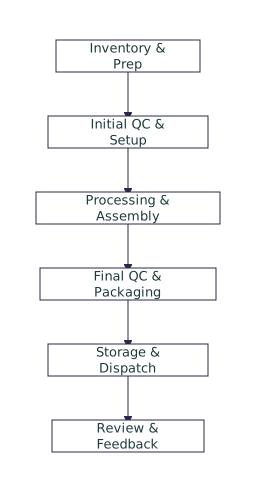
- Gather Your Inventory: Complete your “Digital Ground Zero” list from Phase 1.
- Select Your Command Center: Choose your primary tool based on the philosophy above. Commit to one.
- Link Your Accounts: Securely connect your bank, credit card, and loan accounts to your chosen tool. Start with just your primary checking and one credit card if you feel overwhelmed.
- Set Up Core Categories: Create broad, simple categories like Housing, Transportation, Food, Utilities, Debt, Savings, and Personal. Avoid the pitfall of 50+ micro-categories.
- Create Sinking Funds: Within your tool, set up mini-savings goals for irregular expenses (e.g., “Car Maintenance,” “Annual Insurance,” “Holiday Gifts”). This is a key digital finance organization hack that prevents budget surprises.
- Set Automation Rules: In your app, create rules to auto-categorize transactions from specific merchants (e.g., “Starbucks” always goes to “Food: Dining Out”).
- Perform Your First Manual Review: Go through the past month’s imported transactions. Correct any miscategorizations. This trains your tool and gives you a baseline.
- Adjust & Refine: Based on that review, tweak your category names or budgets. Your first setup won’t be perfect, and that’s okay.
- Schedule Your Weekly Review: Block 15 minutes on your calendar for the same time each week. This habit is the engine of the system.
- Maintain & Evolve: Use your weekly reviews to keep the system current. As life changes, so should your budget categories.
Pro-Tip: Naming Conventions
Keep your category names clear and consistent. For example:
- Use emojis as visual cues (e.g., 🏠 Rent, 🚗 Gas).
- Prefix sinking funds with “SF:” (e.g., SF: Car Repair).
- Group related categories (e.g., “Food – Groceries,” “Food – Dining Out”).
This small step makes scanning your budget much faster during your weekly check-in.
Automation: Your Secret Weapon for Consistency
The single biggest hack for sustainable digital money management is automation. It removes the friction of manual entry, which is where most systems fail. Automated budget management means your tracking happens in the background.
First, ensure all your accounts are connected for transaction import. Most apps use read-only access via secure, third-party aggregators like Plaid or MX. While security is a valid concern, these services are used by millions and major financial institutions. You can further protect yourself by using strong, unique passwords and enabling two-factor authentication on both your bank and budgeting app accounts.
Next, go beyond imports. Set up automatic transfers to your savings or sinking fund accounts right after payday. Use your digital calendar to create alerts for annual or semi-annual bills. The goal is to make the system work for you with as little daily effort as possible.
The Weekly Review: Your 15-Minute Maintenance Ritual
This short, non-negotiable habit is what keeps your digital budget alive. It’s not a deep dive; it’s a quick check-up. Frame it as a calming ritual to gain clarity, not a stressful chore. Here’s your mini-checklist:
- Reconcile Transactions: Quickly scan the past week’s imported transactions. Approve any uncategorized items.
- Check Category Balances: Glance at your main categories. Are you on track, or did dining out blow up this week?
- Note Upcoming Bills: Look at the week ahead. Is money set aside for any scheduled payments?
- Adjust if Needed: Move small amounts between categories if you overspent in one. This is “rolling with the punches.”
- Celebrate a Win: Acknowledge one positive thing—maybe you stayed under your grocery budget or added to a sinking fund.
Imagine it’s a quiet Sunday morning. You open your app with your coffee, spend less time than it takes to brew a pot reviewing the week’s spending, make a couple of quick adjustments, and close it feeling informed and in control, not anxious. That’s the power of the ritual.
Troubleshooting Common Digital Budget Breakdowns
Even the best systems hiccup. Here’s how to fix common issues without abandoning your entire organizing budget digitally effort.
Problem: “My bank account disconnected.”
Solution: This is common. Go into your app’s settings and simply re-link the account. The aggregator service may need you to re-authenticate with your bank. It’s usually a 60-second fix.
Problem: “Transactions are miscategorized.”
Solution: Manually recategorize the transaction, then create a rule so future transactions from that merchant are categorized correctly. This teaches your tool your spending patterns.
Problem: “I feel overwhelmed by all the data.”
Solution: Simplify your view. Hide old, closed accounts. Collapse category groups. Focus only on the “This Month” view. The goal is a simple budget tracking system, not data overload. If needed, reduce your weekly review to just checking three key categories.
Pitfalls to Avoid: Why Most Digital Budgets Fail
Understanding these common mistakes can save your system before it derails. The goal is clarity, not complexity.
Over-Complicating Categories: Creating 30+ subcategories for every type of spending is unsustainable. You’ll burn out on categorizing. Start with 10-15 broad categories and only split them if you truly need the insight.
Neglecting to Reconcile: Letting uncategorized transactions pile up for weeks creates a daunting cleanup task. The weekly 15-minute review prevents this.
Relying Solely on Manual Entry: Manually typing in every coffee and toll fee is a recipe for abandonment. Use automation for the bulk of transactions; manual entry is only for cash spending if you use it.
Ignoring Irregular Expenses: Forgetting about annual subscriptions, car registration, or holiday gifts will wreck your monthly budget. This is why sinking funds are a non-negotiable part of your digital budget setup.
Treating the Budget as Static: Your budget is a living tool. If you get a raise, have a child, or move, your categories and allocations must change. A budget that doesn’t reflect your real life will feel useless and be abandoned.
Evolving Your System: From Tracking to Forecasting
Once your digital budget is organized and running smoothly, it transforms from a simple tracking log into a powerful forecasting tool. You’re no longer just asking, “Where did my money go?” You’re starting to ask, “Where can my money go?”
With a clear history of spending, you can project future cash flow with greater accuracy. You can confidently plan for larger goals—a down payment, a debt payoff date, or building a more robust emergency fund. This shift, from reactive tracking to proactive planning, is where the real reduction in financial stress happens. The Consumer Financial Protection Bureau emphasizes that clarity about your money is a foundational step toward financial well-being. Your organized digital system provides that clarity, turning anxiety into actionable insight.
Your Next Step Starts Today
The path from financial overwhelm to clarity isn’t paved with perfection; it’s built with simple, consistent actions. You don’t need to implement this entire system at once. The power lies in starting.
Your decisive next step is this: open your calendar right now and block 15 minutes for this week. Label it “Financial Check-In.” When that time comes, complete just Phase 1—create your “Digital Ground Zero” inventory list. That single act of gathering creates immediate visibility, which is the first win. From there, you can take the next step, and the next. Your organized, sustainable digital budget is built one simple hack at a time.
Effective digital budget organization boils down to three core principles: Consolidation, Automation, and Consistent Review. First, bring all your financial accounts into one primary tracking tool to create a single source of truth. Second, leverage automation through bank connections and rule-based categorization to eliminate manual data entry friction. Finally, protect the system with a short, non-negotiable weekly review ritual to keep everything current and adjusted. The goal is never complexity—it’s creating a clear, always-available picture of your finances that empowers your decisions and reduces stress.
Q: Can I organize my budget digitally if I’m not tech-savvy?
A: Absolutely. Start with a simple, user-friendly app like Mint or a basic Google Sheet template. The key is choosing a tool that feels intuitive to you. The process is more about habit than high-tech skill. Follow the step-by-step protocol, and don’t be afraid to use the app’s help resources.
Q: Is it safe to connect my bank accounts to budgeting apps?
A: Reputable budgeting apps use read-only connections via established, encrypted third-party services (like Plaid). They cannot move your money. For added security, use strong, unique passwords and enable two-factor authentication on both your bank and the budgeting app. You can learn more about financial data security from resources like the Federal Trade Commission.
Q: How often should I really check my budget?
A: For maintenance, a focused 15-minute weekly review is ideal. This is often enough to catch and correct issues without becoming obsessive. You might glance at it daily for the first week or two out of curiosity, but the weekly ritual is the sustainable habit that keeps the system running.
Q: What’s the one thing I should do first if I feel overwhelmed?
A: Stop trying to do everything. Commit to just one action: gathering your complete financial inventory (Phase 1). Write down every account and bill you have. This single act of creating visibility often reduces anxiety immediately and provides a clear starting point for the next step.
Q: Do I need to use a paid app, or are free tools sufficient?
A: Free tools are more than sufficient to build a robust, organized budget. Many excellent free apps and spreadsheet templates exist. Consider a paid tool only if you’ve outgrown the free options and need specific advanced features, like detailed debt payoff planning or investment tracking integration, that justify the cost for you.