Most people think the stress of budgeting comes from restriction—saying no to things you want. But the real, daily anxiety often stems from a different source: disorganization. You know you have money for your goals *somewhere*, but it’s lost in a fog of mismatched sinking funds and vague spending categories. This chaotic middle ground is where you feel perpetually broke, even when your accounts say otherwise. Mastering your sinking fund and spending category organization isn’t about tracking every penny with more discipline; it’s about building a clear, visual map for your money so every dollar has a specific, intentional job. This shifts you from a reactive position of constant guesswork to a proactive state of automated confidence, turning financial management from a source of stress into a tool for freedom.
The most effective system for sinking fund and spending category organization combines a clear audit of past spending with dedicated ‘containers’ for each fund and hyper-specific naming for each category. Start by reviewing 90 days of transactions to identify your true irregular expenses and fuzzy spending areas. Then, assign each financial goal—from car repairs to holiday gifts—to a specific digital bucket, separate bank account, or physical envelope. Finally, use precise names like “Q4 Car Insurance” instead of just “Car” to eliminate all guesswork, transforming budget anxiety into a reliable, hands-off system.
The Mindset Shift: From Tracking to Containing
If you’ve ever felt broke despite having money in your checking account, you’ve experienced the core failure of traditional budget tracking. Tracking tells you where your money went. It’s a reactive, historical record that leaves you scrambling when an irregular expense—like a car repair or annual insurance bill—inevitably arrives. The anxiety isn’t from a lack of money; it’s from a lack of organization.
The solution is a fundamental shift: move from tracking to containing. Imagine every dollar has a specific job and a dedicated “container” it lives in until that job is due. A spending category (like “Weekly Groceries”) is a container for regular, immediate expenses. A sinking fund (like “Annual Car Registration”) is a container for future, irregular expenses. Your entire financial system becomes a clear, visual map of these containers. This approach filters out those who just want a better tracker; it’s for anyone ready to build a proactive system that eliminates guesswork and stress.
Audit First: Mapping Your Financial Reality
You can’t organize what you don’t understand. Before you create a single new category or fund, you need a no-judgment audit of your last 90 days of spending. This isn’t about shaming your coffee habit; it’s about gathering raw data to see your true financial patterns and uncover every hidden sinking fund need.
The 90-Day Audit Protocol
Follow these steps to build your financial blueprint:
- Gather Data: Export transactions from your bank and credit card statements for the last three months into a simple spreadsheet or use a tool like Mint to categorize them automatically.
- Categorize Broadly: Don’t get detailed yet. Start with 5-10 broad buckets like “Food,” “Transport,” “Utilities,” “Shopping,” “Subscriptions,” and “Miscellaneous.”
- Flag the Irregular: As you categorize, highlight any expense that wasn’t a predictable, monthly bill. This includes things like medical copays, home maintenance, gifts, and vehicle repairs. These are your sinking fund candidates.
- Calculate Averages: For each broad category, calculate your average monthly spend. For each irregular expense, note its total annual cost and divide by 12 to find your needed monthly contribution.
This audit is the most powerful of all budget category organization hacks because it moves you from guessing to knowing. You’ll likely discover 5-10 sinking funds you never formally acknowledged.
Your Organization Toolkit: Digital, Physical, and Hybrid
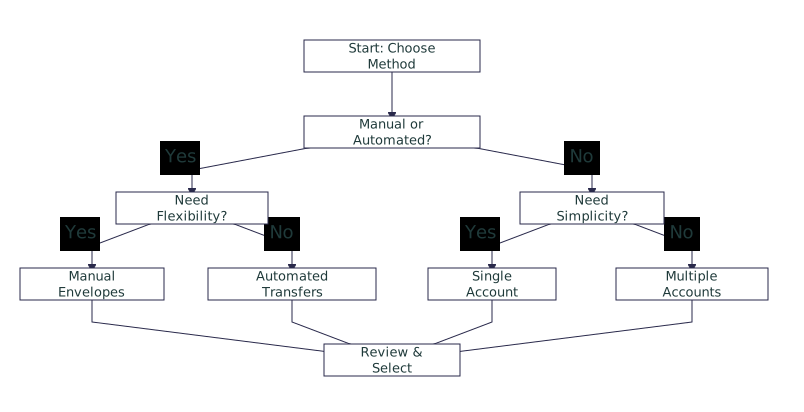
Once you know what needs containing, you choose your containers. The best method is the one you’ll actually use consistently. Here’s a breakdown of the primary tools for sinking fund organization.
Digital App Buckets
Apps like YNAB (You Need A Budget) or Goodbudget use virtual “envelopes” or “buckets” within a single account. Pros: Highly automated, great for tracking, easy to adjust. Cons: The money is physically commingled, which can require more discipline since you don’t “see” separate balances at a glance.
Separate Bank Accounts
This involves opening multiple, no-fee savings accounts (many online banks offer this) for major fund groups. Pros: Creates clear physical separation, reduces temptation, and can earn interest. Cons: More accounts to manage, and transfers between them aren’t instantaneous.
Cash Envelope System
The classic method: withdraw cash and divide it into physical envelopes labeled for each category or fund. Pros: Tangible, psychologically powerful, spending stops when the cash is gone. Cons: Inconvenient, not secure for large sums, impossible for online bills.
Hybrid System
Most people find a hybrid works best. For example, use a budgeting app for daily spending categories and a separate high-yield savings account with sub-accounts for your large, long-term sinking funds (like “Car Replacement” or “Vacation”).
Toolkit Quick-Start Tips
- Start Simple: If new, begin with a budgeting app. The automation lowers the barrier to entry.
- Security First: Never keep large amounts of cash. Use an FDIC-insured bank for any significant sinking fund.
- Test Drive: Commit to one method for a full month before deciding if it fits. Switching constantly is a common pitfall.
One individual we spoke to switched from using only app buckets to having two dedicated savings accounts—one for “Life” sinking funds (car, gifts, medical) and one for “Home” projects. They reported an immediate mental clarity: “Seeing the ‘Car Fund’ balance grow in its own account made it feel real, not just a number in an app I could easily reallocate.”
Building the Structure: Naming and Categorizing Your Money
This is where true organization happens. Vague names lead to vague behavior. Your category and fund names should be so specific that there’s zero ambiguity about what money belongs there or what it’s for.

The Naming Protocol for Spending Categories
Move beyond generic terms. Instead of “Food,” create “Weekly Groceries,” “Work Lunches,” and “Restaurant Dining.” This specificity allows for targeted adjustments. For example, if “Restaurant Dining” is consistently overspent, you have a clear problem to solve, not a vague “food budget” issue.
The Naming Protocol for Sinking Funds
Sinking fund names should include the purpose and often the timeline. This transforms them from abstract savings to concrete goals.
- Weak: Car Fund
- Strong: Car Maintenance Sinking Fund (Target: $600)
- Stronger: 2024 Holiday Gifts Sinking Fund
- Strongest: Q3 2024 Car Insurance Sinking Fund
This level of detail in your spending category setup eliminates decision fatigue. When you get paid, you’re not wondering “what does this money cover?”—you’re simply filling the clearly labeled containers. For a massive list of category ideas, resources like NerdWallet’s budget category list can provide inspiration.
The Funding Protocol: How to Fill Your New System
The biggest hurdle is often, “Where do I get the money to start all these funds?” You don’t need a windfall. Choose the scenario that matches your current position.
Scenario 1: The Fresh Start (Next Month’s Income)
This is the cleanest method. Use your audit data to assign every dollar of your next paycheck to its specific category and fund. You begin the month with a fully funded, zero-based system. This works well if you’re living paycheck-to-paycheck but your income covers your expenses.
Scenario 2: The Gradual Migration (From a Lump Sum)
If you have a small buffer in your checking account (e.g., $500), use it to seed your most critical sinking funds. Allocate, for example, $200 to “Car Maintenance,” $150 to “Medical Deductible,” and $150 to “Home Repairs.” Then, use your income to replenish your checking for monthly bills while making small monthly contributions to grow those seeds.
Scenario 3: The Clean Slate (Post-Debt Payoff)
If you’ve just finished paying off a debt, redirect the entire monthly payment amount you were making into your new sinking fund system. Your budget already accommodated this cash flow, making it a seamless and powerful transition to building savings instead of paying interest.
The Maintenance Routine: Keeping It Alive Beyond Day One
The hard work is in the setup. Maintenance is a simple, non-negotiable routine that takes minutes. The goal is the “Check, Allocate, Adjust” cycle.

Photo by Lukas Blazek on Pexels
The Weekly Money Date (10 Minutes)
Every week, sit down with your system. Reconcile transactions (most apps do this automatically), ensuring every spent dollar is assigned to its container. This prevents “budget drift” and keeps your map accurate.
The Monthly Allocation Session (20 Minutes)
When you receive income (paycheck, etc.), allocate it to your categories and funds until every dollar has a job, following the plan you built. This is when you actively fill your containers.
The Quarterly Review (30 Minutes)
Every 3-6 months, review your category and fund names. Are they still accurate? Are you consistently overspending in one category? This is your chance to adjust your budget category management system to fit your evolving life, not force your life into an outdated system.
Maintenance Quick-Start Tips
- Schedule It: Put your Weekly Money Date on your calendar as a recurring appointment.
- Pair It: Do it with a pleasant ritual, like your morning coffee or Friday afternoon tea.
- Automate Transfers: For sinking funds in separate accounts, set up automatic monthly transfers right after payday.
- Embrace Adjustments: Moving money between categories is not failure; it’s smart system management.
Common Organization Pitfalls (And How to Sidestep Them)
Even with a great plan, it’s easy to stumble. Here are the most frequent mistakes in sinking fund tracking methods and how to avoid them.
Pitfall 1: Over-Complicating Categories
The Mistake: Creating 50 hyper-specific categories for every possible expense. The Hack: Start with broader categories and only split them if you consistently overspend and need more visibility. “Personal Care” can cover hair, toiletries, and cosmetics until it becomes a problem area.
Pitfall 2: Under-Funding Sinking Funds
The Mistake: Guessing at how much to save for irregular expenses. The Hack: Use your audit data! Take the total annual cost (e.g., $600 for car maintenance) and divide by 12. That’s your non-negotiable monthly contribution ($50). This is the core of how to organize sinking funds effectively.
Pitfall 3: Tool Inconsistency
The Mistake: Using a spreadsheet, an app, and cash envelopes all at once without a master plan. The Hack: Designate one tool as your “source of truth.” All other tools should feed into or support that one system to prevent confusion.
Pitfall 4: Skipping the Monthly Review
The Mistake: Setting it and forgetting it. Life changes, and your budget must adapt. The Hack: Make the quarterly review non-negotiable. If a category is consistently wrong, change it. The system works for you, not the other way around.
Advanced Hacks: Leveling Up Your Organized System
Once your basic system is humming, these optional upgrades can enhance efficiency and psychological payoff.
Create Sinking Fund Tiers
Not all funds are equal. Create tiers based on priority and timeline:
- Tier 1 (Essential & Near-Term): Car Maintenance, Medical Deductible, Property Taxes. Fund these first.
- Tier 2 (Important & Mid-Term): Holiday Gifts, Vacation, Home Repairs.
- Tier 3 (Long-Term & Aspirational): Car Replacement, New Furniture Fund.
Use High-Yield Savings Accounts (HYSAs)
If you use separate accounts, place your sinking funds in a HYSA. Earning interest on your “Car Repair” money is a small but satisfying reward for your organization.
Automate Everything Possible
Set up automatic transfers to your sinking fund accounts and scheduled contributions within your budgeting app. This makes proactive saving the default, removing willpower from the equation.
Bundle for Cash Flow Simplicity
If managing 12 separate sinking fund contributions feels overwhelming, bundle them. Add up all your monthly sinking fund targets (e.g., $300 total) and transfer that lump sum to one “Sinking Fund Hub” account. Track the individual fund balances within that account using a simple spreadsheet or your app’s notes feature.
Your Next Step to Financial Clarity
The path from budget chaos to calm control isn’t paved with more willpower—it’s built with better containers. You now have the toolkit: the audit to see reality, the protocols to build your structure, and the routine to maintain it. The final, decisive step is to start.
This week, choose one thing from your audit. It could be that vague “Car Stuff” category or the looming holiday season you haven’t saved for. Apply the protocol: give it a specific, actionable name and place it in a dedicated container (a new app bucket, a labeled envelope, a sub-account). Fund it with whatever amount you can, even if it’s $5. Mastery of your entire financial picture comes from starting this process in one corner, not from crafting a perfect, all-encompassing plan you never launch. Your organized, confident financial life begins with that single, clear container.
Organizing your sinking funds and spending categories transforms budgeting from a reactive tracking chore into a proactive containment system. The core philosophy is simple: give every dollar a specific job in a dedicated “container,” eliminating guesswork and stress. The process unfolds in three key phases:
- Audit: Map your last 90 days of spending to uncover true patterns and all hidden irregular expenses, moving from guesswork to data.
- Build Your Toolkit: Choose your primary organizational method—digital app buckets, separate bank accounts, cash envelopes, or a hybrid—based on your need for automation versus tangibility.
- Establish Your Routine: Maintain the system with a simple weekly check-in and monthly allocation session, making adjustments as life evolves.
The ultimate benefit isn’t just a balanced spreadsheet; it’s a significantly reduced mental load. When you know exactly where your money for next Christmas, your next car repair, or your quarterly insurance bill is waiting, financial anxiety is replaced by automated confidence.
Q: What’s the difference between a sinking fund and an emergency fund?
A: A sinking fund is for planned, irregular expenses you know are coming (car maintenance, holidays, insurance). An emergency fund is for unplanned, unexpected crises (job loss, major medical event). Sinking funds prevent emergencies by ensuring predictable expenses don’t become financial shocks.
Q: How many sinking funds is too many?
A: There’s no magic number, but if managing them causes stress or confusion, it’s too many. Most people find 5-10 funds manageable. Use the “tier” system or bundling hack to simplify. The goal is clarity, not complexity.
Q: Should I use separate bank accounts or a budgeting app for sinking funds?
A: It depends on your psychology. Separate accounts offer clear physical separation and can earn interest, which is great for discipline. App buckets are more flexible and integrated with daily spending tracking. Many find a hybrid best: an app for monthly categories and a separate savings account for major, long-term sinking funds.
Q: What if I don’t have extra money to start funding these categories?
A: Start with your next paycheck (the “Fresh Start” scenario). Allocate every dollar to a job, even if some categories get only $1 initially. This establishes the system’s